Download the App


#myiFXBrokers
Client Portal
Being a regulated broker means maintaining strict compliance standards and robust client fund protection procedures. At iFX Brokers, safeguarding client funds is a core part of our operations. We apply regulatory compliance measures, secure account management processes, and platform-level safeguards to help ensure your trading account funds are protected, giving you greater confidence when trading with us.
What is the iFX Brokers Client Portal?
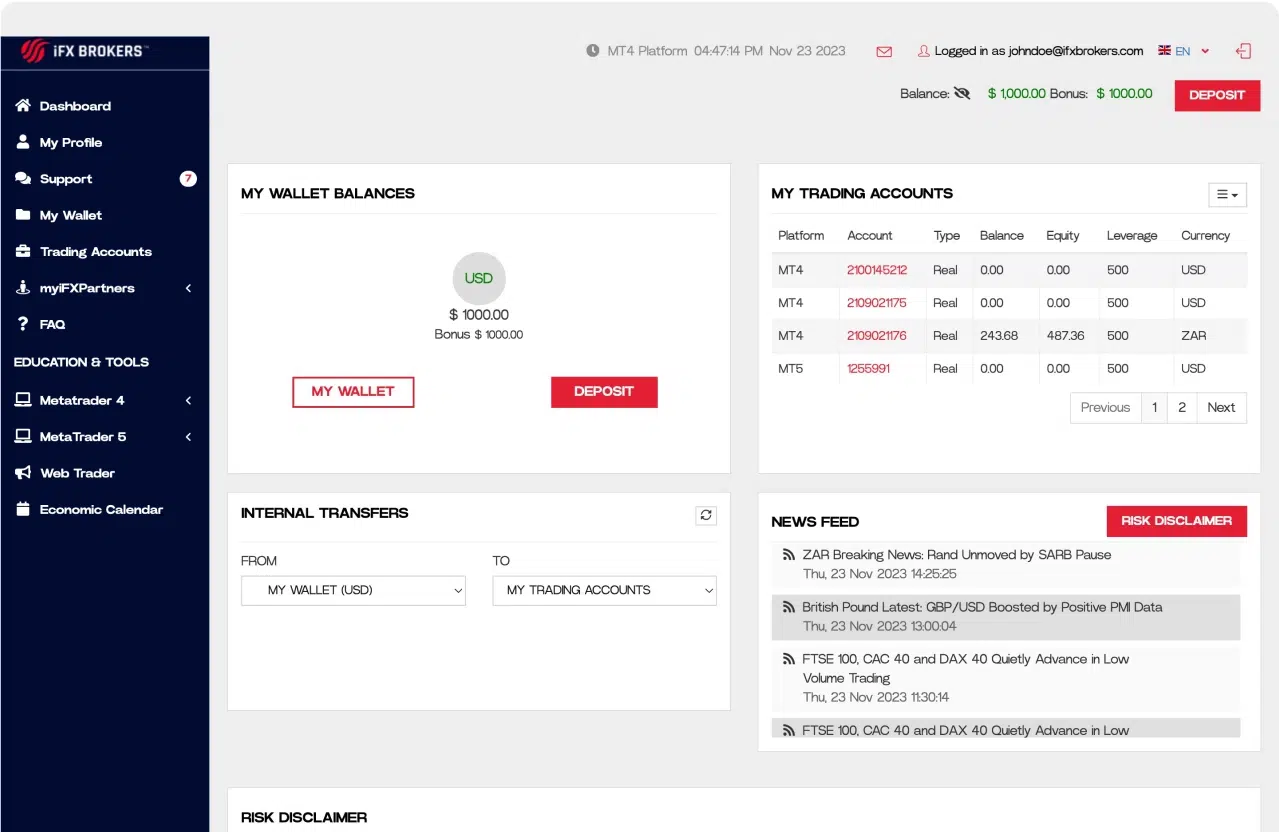
The iFX Brokers Client Portal is a secure online dashboard where clients can manage their trading accounts, deposits, withdrawals, verification documents, and platform settings in one place. It provides convenient access to account management, funding, trading information, and support tools to help you manage your trading experience efficiently.


How the iFX Brokers Platform Works
The iFX Brokers trading system is built around three core components:
1. Client Portal – Manage your account, personal information, funding, and verification.
2. iFX Wallet – Securely hold and transfer funds between your wallet and trading accounts.
3. MetaTrader 4 & MetaTrader 5 – Execute trades and monitor the financial markets.
-

ACCOUNT MANAGEMENT
- Fast withdrawal process;
- Variety of funding methods;
- Upload account documents;
- Manage personal information;
- Password change;
- Transferring funds between accounts;
- Change leverage.
-
TRADING ACCOUNTS
- Account history;
- Current positions free & used margin;
- Balance & equity;
- View your withdrawal and deposit history.
-
iFX WALLET
- Central account from which you can transfer money to your trading accounts with a few simple clicks;
- iFX Wallet funds protected from any open positions in your trading account;
- Real time transfer to and from trading accounts.
-
TRADING TOOLS AND SUPPORT
- Sophisticated ticket system for instant support;
- Market watch;
- Economic Calendar;
- Downloads.


-
HOW DO I ADD MY BANK ACCOUNT
-
HOW DO I CHANGE MY MT4 & MT5 PASSWORD
-
How do I Change my myiFXBrokers Password
-
HOW DO I CHANGE THE LEVERAGE ON MY MT4 & MT5 ACCOUNTS
-
HOW DO I DEPOSIT FUNDS TO MY TRADING ACCOUNT
-
HOW DO I LOGIN TO myiFXBrokers
-
HOW DO I OPEN A NEW TRADING ACCOUNT
-
How do I transfer funds to and from MY iFX Wallet
-
HOW DO I UNDERSTAND MY MT4 & MT5 TRADING STATEMENTS
-
HOW DO I UPLOAD MY VERIFICATION AND PROOF OF IDENTITY DOCUMENTS
-
How do I Withdraw funds from my iFX Wallet
-
How do I send a Support ticket
Frequently Asked Questions
What is the iFX Brokers Client Portal?
How do I deposit funds?
How long do withdrawals take?
Can I transfer funds between accounts?
How do I contact support?
We are Here to Support You!
REST ASSURED, AT IFX BROKERS WITH ITS CLIENT - CENTRIC STANCE, OUR SUPPORT TEAMS ARE GEARED TO ASSIST YOU EVERY STEP OF THE WAY, RESULTING IN A SEAMLESS AND SUCCESSFUL TRADING EXPERIENCE.
Help center
An experienced Technical Support Team is available 6 days a week via our Instant Ticket facility to assist with any queries related to the opening of your trading account and the installation of the trading platform.